

Imagine you're five minutes into a high-stakes video call when your screen freezes and the audio cuts out completely. This isn't just a technical glitch; it's a stressful disruption that makes your own home feel unreliable. You've likely dealt with "dead zones" in older rooms or smart devices that randomly drop offline, leaving you to wonder why your setup isn't working as promised. A professional home technology walkthrough is designed to end this cycle of frustration by uncovering the specific connectivity bottlenecks unique to your living space.
We know that you're looking for stability, not just a pile of new gadgets. It's exhausting to get conflicting advice from providers who only want to sell you more hardware you might not even need. This guide will show you how a methodical audit identifies what's actually broken, often allowing you to fix issues with the equipment you already own. You'll gain a clear understanding of your home's technical health and a roadmap to ensure your home office and entertainment systems stay stable, secure, and ready for your daily life.
Key Takeaways
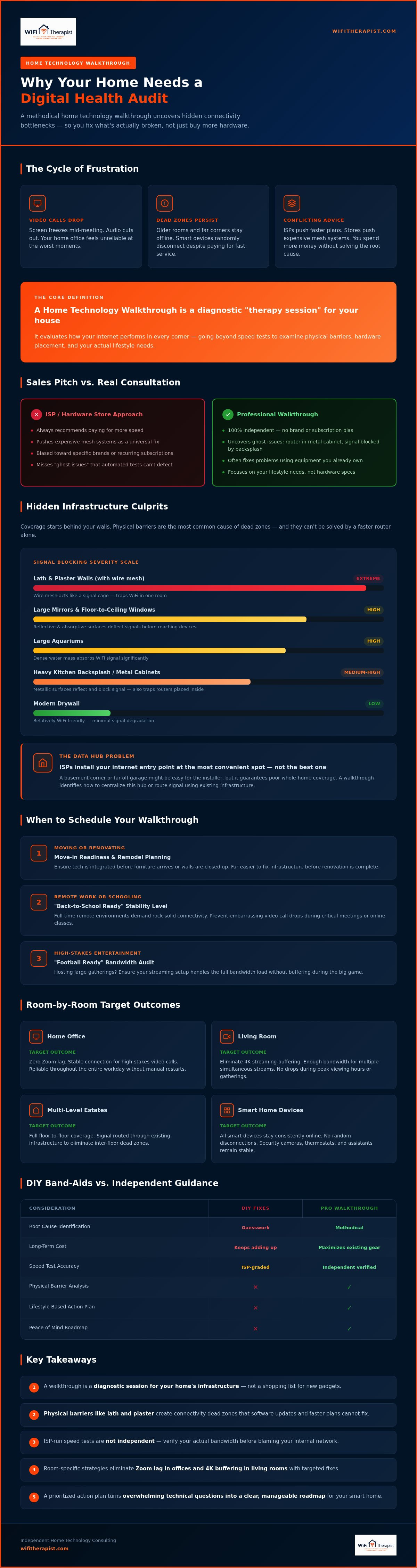
- Learn why a home technology walkthrough is a diagnostic "therapy session" for your house that focuses on infrastructure health before you buy new gadgets.
- Discover how physical barriers like lath and plaster or poorly placed data hubs create connectivity dead zones that software updates can't fix.
- Compare the long-term costs of DIY "band-aid" fixes against independent guidance that maximizes the value of your current resources.
- Identify room-specific strategies to eliminate Zoom lag in your office and 4K streaming buffering in your living room.
- Build a prioritized action plan that provides peace of mind and a roadmap for a reliable, frustration-free smart home.
What is a Home Technology Walkthrough? Defining the Digital Audit
A home technology walkthrough is a diagnostic tool for residential connectivity that evaluates how your internet performs in every corner of your house. It is a methodical assessment of your home's digital health, focusing on why your devices might be struggling despite you paying for high-speed service. Instead of just running a basic speed test, this audit looks at the physical environment. It identifies hidden barriers like thick lath and plaster walls, large mirrors, or electronic interference from household appliances that degrade your signal. This process moves beyond abstract hardware specifications and focuses on your actual lifestyle needs, ensuring your home office is reliable and your daily routines remain uninterrupted.
The Difference Between a Sales Pitch and a Consultation
When you call an internet service provider (ISP) about a slow connection, their solution is almost always predictable. They suggest you pay for more speed or rent a newer router from them. Hardware stores often follow suit, pushing expensive mesh systems as a universal fix for every household. These recommendations are usually biased toward a specific brand or a recurring monthly subscription. A professional home technology walkthrough is fundamentally different because it is independent. It uncovers "ghost issues" that automated software tests frequently miss, such as a router tucked inside a metal cabinet or a signal being blocked by a heavy kitchen backsplash. By focusing on the infrastructure rather than the sale, you can often fix your problems by optimizing the equipment you already own.
When Should You Schedule a Walkthrough?
Technical complications often peak during major life transitions or when your home's layout changes. Scheduling a home technology walkthrough is particularly valuable during these specific milestones:
- Moving or Renovating: Use Move-in Technology Readiness or Remodel and Renovation Planning to ensure your tech is integrated before the furniture arrives or the walls are closed up.
- Remote Work or Schooling: Transitioning to a full-time remote environment requires a "Back-to-School Ready" level of stability to prevent embarrassing video call drops during important meetings.
- High-Stakes Entertainment: If you host large gatherings, a "Football Ready" audit ensures your streaming setup can handle the bandwidth load without buffering during the big game.
Preparation is the best shield against future digital stress. Whether you are managing a complex multi-level estate or a simple home office, a walkthrough provides the foresight needed to keep your digital life running smoothly. It acts as a stabilizing presence, turning overwhelming technical questions into a clear, manageable path forward.
The Infrastructure Audit: Why Coverage Starts Behind Your Walls
The success of your digital life depends on things you rarely see. While many tech guides focus on the latest router specifications, a professional home technology walkthrough starts with your home's "bones." Modern drywall is relatively friendly to WiFi signals, but older lath and plaster walls are a different story. These older structures often contain wire mesh that acts like a cage, trapping your signal in one room and leaving the rest of the house in a digital desert. Understanding these physical realities helps explain why "just buying a faster router" rarely solves the problem. We use plain-English explanations to help you see how signal decay happens when your WiFi has to fight through dense materials.
The "Data Hub" is another critical factor. This is where your internet service enters the house. ISPs typically install this at the easiest point of entry, such as a corner of the basement or a far-off garage. This placement is rarely ideal for whole-home coverage. During a home technology walkthrough, we look at how to centralize this hub or use existing infrastructure to move the signal where it's needed most. It's also vital to perform independent isp speed verification. You need to know if you're actually receiving the bandwidth you pay for before blaming your internal network for every laggy video call.
Overcoming Physical Barriers
WiFi signals are surprisingly delicate. Large mirrors, floor-to-ceiling windows, and even large aquariums can act as "WiFi shields," reflecting or absorbing the signal before it reaches your device. In multi-level estates or homes with detached garages, these barriers multiply. For lath and plaster homes, we often look for creative ways to route signals without the invasive process of pulling new wires through historical walls. This might involve repositioning existing equipment to find a clearer path through doorways or hallways.
The Wiring Reality Check
Many homeowners overlook the goldmine already sitting in their walls. Existing Ethernet or Coax ports can often be repurposed for "backhaul." This means using a physical wire to connect different parts of your network, which is far more stable than a purely wireless setup. Wireless mesh systems are popular, but they aren't a magic bullet for large properties. If the mesh nodes can't talk to each other through thick walls, your speeds will plummet. If you are currently planning a project, Remodel and Renovation Planning can help you place these connections strategically before the walls are closed. This foresight prevents expensive retrofits later and ensures your smart home has a solid foundation from day one.
DIY vs. Managed Services vs. Independent Guidance
Choosing how to fix your home network usually leads down one of three paths. Many people start with the DIY approach. It costs very little upfront, but it requires a high level of effort. You might spend your weekends scrolling through technical forums or watching confusing tutorials. This often leads to "band-aid" fixes, like adding a cheap range extender that eventually creates more interference than it solves. These temporary solutions fail to address the root cause of your connectivity issues.
Other homeowners prefer managed services from large providers like Comcast or Vivint. This is a low-effort choice, but it comes with high long-term costs. These companies often lock you into proprietary ecosystems and monthly equipment fees. If you decide to cancel their service, you might find that your smart home devices no longer work together or require a complete overhaul. This lack of independence can leave you feeling stuck with a provider that doesn't prioritize your specific needs.
A professional home technology walkthrough offers a different way forward through independent guidance. As a technical mentor, my goal is to provide objective advice without the pressure of a hardware sale. We focus on a fixed-fee model, starting with a $50 discovery call, that empowers you to understand your own network. This stabilizing presence helps you move from frustration to control, ensuring you have a reliable system that you actually own and understand.
Avoiding the "Hardware Trap"
It is a common mistake to think that more expensive gear is a universal solution. Buying a $400 router will not fix a $0 placement problem. If your equipment is stuck in a metal cabinet or a basement corner, even the most advanced hardware will struggle to perform. By auditing your existing gear during a home technology walkthrough, an independent consultant can often save you hundreds of dollars by simply optimizing what you already have. If you are moving, a Move-in Technology Readiness plan ensures your foundation is solid before the first box is unpacked, avoiding the common stress of a "Day 1" technical failure.
Plain English Wi-Fi Advice
Technical jargon often makes homeowners feel alienated or unintelligent. We believe in translating complex terms like "MIMO" or "backhaul" into functional concepts like "work-from-home reliability." There is a significant emotional benefit to working with a guide who is patient and non-judgmental. You deserve to have your questions answered without feeling talked down to. Seeking plain english wifi advice is the first step toward reducing tech stress and taking back control of your digital life. This approach focuses on human outcomes rather than abstract specifications.
A Room-by-Room Walkthrough Checklist for Modern Households
A home technology walkthrough is most effective when it moves from the general infrastructure into the specific rooms where you live and work. Each space has unique demands. Your office needs stability for video calls, while your living room requires high bandwidth for entertainment. By walking through your home room by room, we can identify exactly where the signal falters and why. This practical approach ensures that your technical fixes align with your daily habits and specific household needs.
The Home Office Reliability Audit
Reliability in a home office is measured by more than just raw download speeds. While a standard speed test might look promising, "Zoom lag" is often caused by jitter, which is the variation in the time it takes for data packets to arrive. High jitter makes video calls choppy and professional presentations frustrating. During a home technology walkthrough, we test for these inconsistencies specifically. We also look for interference from Bluetooth peripherals or neighboring WiFi networks that compete for the same airwaves. A simple checklist item involves verifying your desk placement. Moving your workstation just a few feet away from a structural pillar or closer to a doorway can significantly improve your connection quality. If you are struggling to stay connected during meetings, you can Book a Consultation to stabilize your workspace.
Entertainment and Outdoor Zones
The living room is the heart of home entertainment, but it's often where buffering issues are most visible. Streaming 4K content requires a sustained, high-speed connection that doesn't dip when someone else in the house starts a download. We audit these zones to ensure "Football Ready" performance, preventing the dreaded spinning wheel during the final minutes of a big game. Bedrooms present a different challenge, especially for students. We balance the need for quiet study areas with the physical distance from the main router, ensuring that learning isn't interrupted by a weak signal. This often involves a "Back-to-School Ready" check to verify that every desk has the bandwidth it needs.
Outdoor coverage is frequently neglected until a smart doorbell or security camera fails to stream video. These devices might show as "connected" in an app, but they often lack the signal strength to upload high-definition footage through exterior walls. We check the signal reaching your patios, guest houses, and entryways. This ensures that your security system is actually functional rather than just a decorative piece of hardware. By identifying these gaps, we create a comprehensive plan that covers every inch of your property without requiring unnecessary hardware purchases.
Turning Your Walkthrough into a Strategy with a Technical Mentor
A professional home technology walkthrough is only as good as the action it inspires. Once the audit is complete, you receive a prioritized Action Plan that breaks down exactly what needs to change. This roadmap ensures you aren't guessing which device to buy or which setting to toggle. It provides a stabilizing path forward, whether you are managing a complex property through Destination & Estate Property Services or just trying to get your home office stable. We believe that technology should be a quiet, supporting presence in your home, not a source of chronic anxiety. By turning raw data into a clear strategy, you gain control over your environment. If the audit reveals deep-seated infrastructure issues, it might be time to look at when to hire a home network consultant to oversee the implementation.
Your Personalized Technology Roadmap
A WiFi Therapist assessment report is written for humans, not machines. It translates technical data into plain-English instructions that focus on your daily life. You can use this data to hold your ISP accountable if they aren't delivering the speeds you pay for. Having this documentation provides a sense of advocacy; you're no longer at the mercy of a technician's vague explanations. This preparation creates a Move-in Technology Readiness that lasts for years, giving you long-term peace of mind. If you are planning a larger project, this data feeds directly into Remodel and Renovation Planning. It ensures that tech isn't an afterthought in your architectural design.
Start Your Journey Today
The $50 remote discovery call is a low-barrier way to get expert answers immediately. It is an accessible entry point for national clients who need a wise, independent guide to look at their setup. You don't need to be a tech expert to start this process. We walk through the symptoms together, moving logically from what you're experiencing to why it's happening. To prepare for your first call, follow this simple 3-step checklist:
- List your primary "pain points," such as buffering in the bedroom or Zoom lag.
- Note the location of your main internet hub and any existing wiring ports.
- Gather your most recent ISP bill to verify your current service level.
Taking this first step lowers your stress levels and puts you on the path to a frustration-free home. You deserve a digital life that works for you, not the other way around. Book your $50 consultation with a WiFi Therapist and start building your roadmap today.
Take Control of Your Digital Environment
Your home should be a place of relaxation, not a source of technical frustration. By completing a home technology walkthrough, you move from guessing why your video calls lag to having a clear, prioritized strategy for stability. You don't always need to purchase the latest router to see results; often, the solution lies in optimizing your existing setup and understanding the physical barriers within your walls. Whether you live in a modern estate or a historic home with lath and plaster, expert guidance helps you extract the most value from your current resources.
We provide a 100% independent perspective with no hardware sales or ISP kickbacks, ensuring our advice is always in your best interest. You can access this expertise through national remote consultations, which provide a stabilizing presence for your digital life. Book your $50 independent tech consultation today to begin your journey toward a reliable, frustration-free smart home. It's time to stop the buffering and start enjoying a network that finally works for you.
Frequently Asked Questions
What is the difference between a home tech walkthrough and a standard ISP speed test?
A standard speed test only measures the amount of data reaching your modem from your provider. A home technology walkthrough examines the internal health of your network and how that signal travels through your specific walls to reach your devices. It identifies physical barriers and electronic interference that a simple speed test cannot detect.
Do I need to buy new hardware before a technology walkthrough?
You don't need to purchase any new equipment before we speak. Our goal is to audit your existing gear first to see if we can solve your issues by simply optimizing what you already own. Because we don't sell hardware, our advice remains 100% objective and focused on saving you money by avoiding unnecessary upgrades.
Can a tech walkthrough help with WiFi issues in an old house with thick walls?
Yes, we specialize in the unique challenges of lath and plaster construction and multi-level estates. We identify exactly how dense materials are trapping your signal and find creative ways to route connectivity around these obstacles. This allows you to improve performance without the invasive process of physical cable pulling through historic walls.
How long does a typical home technology walkthrough take?
The process begins with a $50 remote discovery call that typically lasts about thirty minutes. During this time, we move logically through your symptoms to identify the root cause of your frustrations. This methodical approach ensures we create a prioritized action plan that fits your specific schedule and household needs.
Will a walkthrough help me fix buffering on my smart TV during live sports?
Reducing buffering is a core outcome of our service. We use the home technology walkthrough to ensure your living room is "Football Ready" by optimizing the signal path to your entertainment center. This ensures your 4K streaming remains stable and clear during high-stakes games or movie nights.
Is a remote technology walkthrough as effective as an on-site visit?
Remote sessions are highly effective for diagnosing the vast majority of placement and configuration issues. We act as your technical mentor, guiding you through a step-by-step audit of your home's digital health. This allows us to provide expert guidance to clients nationwide without the higher cost of a traditional on-site visit.
What information should I have ready before my walkthrough consultation?
Please have a copy of your recent ISP bill and a list of your most frustrating "dead zones" or laggy rooms. It's also helpful to know the general location of your main router and any existing wiring ports. This preparation allows us to spend more time on solutions rather than gathering basic data.
Does a tech walkthrough include smart home security planning?
We include connectivity planning for all smart home devices, including security cameras and doorbells. We verify that these exterior devices have the signal strength required to upload high-definition video reliably. This is a critical part of our estate property services, ensuring your security system is functional rather than just decorative.


