

If you ask your internet provider if your connection is performing well, they will almost always say yes. It is a bit like asking a student to grade their own final exam; the results are rarely objective. You might see "Gigabit" on your monthly bill, but independent isp speed verification is the only way to know if that speed is actually reaching your laptop. It is incredibly frustrating to feel gaslit by customer support when your video calls freeze, especially when the median download speed in the U.S. has climbed to 306 Mbps as of July 2026.
We know how exhausting it is to juggle technical terms like latency and jitter while simply trying to get the service you pay for. You deserve a connection that supports your household's average of 17 to 21 connected devices without the constant stress of troubleshooting. This guide will help you move past the marketing claims and use unbiased methods to uncover the truth about your network. We will explain the new FCC broadband labels, show you why your provider's internal test might be misleading, and offer a clear path to finding the performance you were promised.
Key Takeaways
- Understand why your provider's internal speed test might show perfect results while your actual browsing feels sluggish or unreliable.
- Learn about the "Reliability Trio" and how factors like latency and jitter impact your daily video calls more than raw download numbers.
- Follow a simple step-by-step process for independent isp speed verification using non-affiliated platforms and direct hardware connections.
- Discover what "good" performance actually looks like for a 2026 home office so you can spot the subtle signs of ISP throttling.
- See how a professional assessment differs from a free web test by identifying whether your connectivity issues are environmental or provider-based.
The Conflict of Interest in ISP-Provided Speed Tests
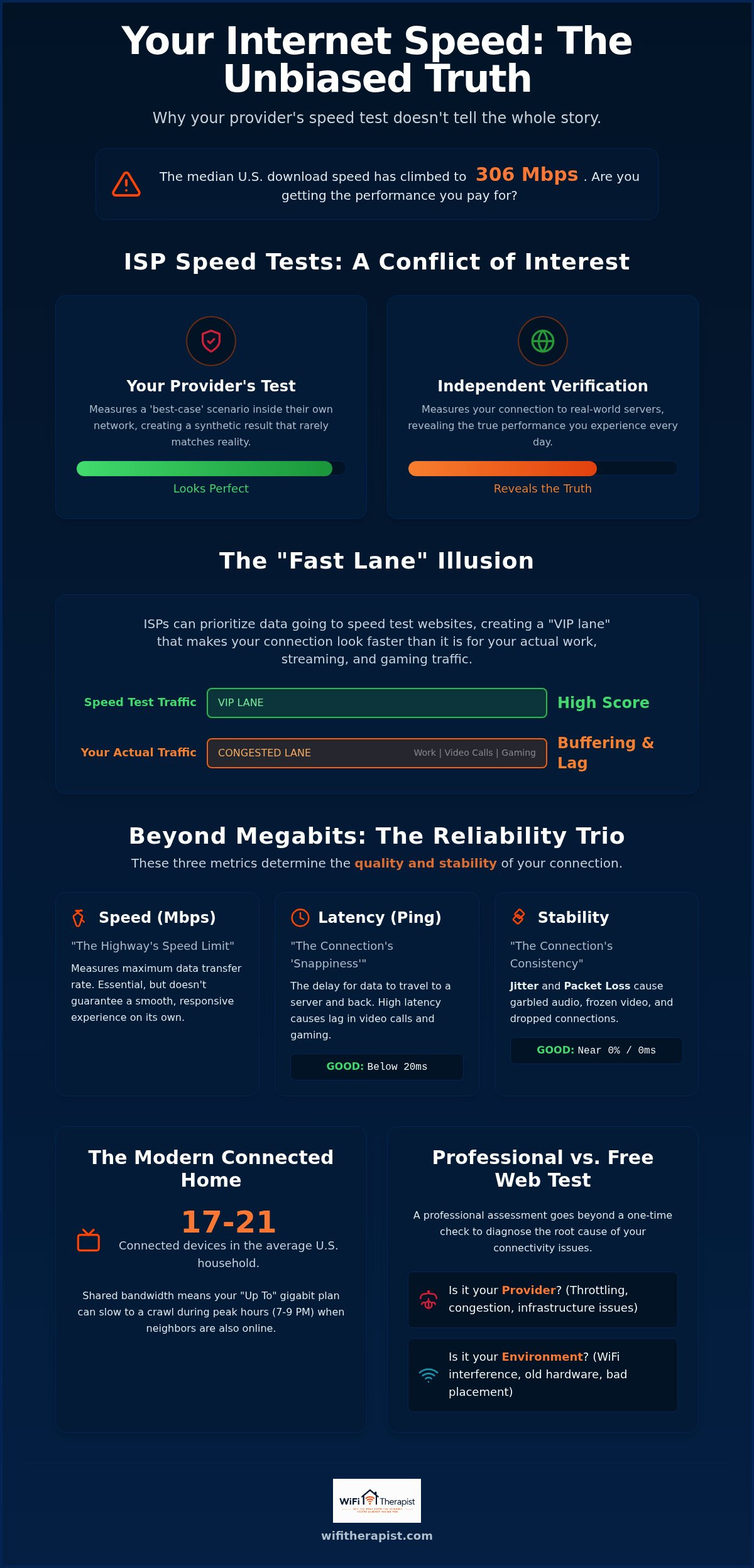
It is natural to trust the speed test tool found on your provider's login page. After all, they built the network, so they should know how it's performing. However, this creates a fundamental conflict of interest. When an ISP provides the tool to measure their own service, they are essentially grading their own homework. These internal tests often measure the connection between your home and the ISP's local data center, rather than the actual path your data takes to reach the rest of the world. This is why independent isp speed verification is so vital for getting an honest look at your performance.
Independent verification means testing your connection against servers that have no affiliation with your provider. This removes the "home field advantage" and gives you a much clearer picture of how your internet handles real-world traffic. Without this outside perspective, you are only seeing a "synthetic" result. This is a test designed to show the maximum theoretical capability of the line under perfect conditions, which rarely matches the lived experience of a busy household.
The 'Fast Lane' Illusion
Many providers use a technique called traffic prioritization. When their systems detect data packets heading toward a well-known testing server, such as Speedtest.net, they give those packets the "VIP treatment." They clear the path and ensure that specific data moves as quickly as possible. This creates an illusion of high performance. You might see a beautiful, high-speed result on the screen, but your actual web traffic for work or gaming is still stuck in the slow lane. This happens because the ISP's peering points, the digital intersections where their network meets the rest of the internet, might be congested for normal traffic even while the speed test path remains wide open.
Why 'Up To' Speeds Are Not Guarantees
We have all seen the "up to" disclaimer in internet advertisements. It is a small phrase that carries a lot of weight. Most residential internet connections rely on shared bandwidth. This means you are essentially sharing a large "pipe" of data with your neighbors. During peak hours, like when everyone sits down to stream movies at 7:00 PM, that shared pipe becomes crowded. An independent test conducted during these busy times will often reveal a significant drop in performance that the ISP's marketing materials never mentioned. Understanding these fluctuations helps you set realistic expectations for your home technology and allows you to hold your provider accountable for the service you actually receive.
The Difference Between Plan Speed and Your Lived Experience
Most people judge their internet connection by a single number: Megabits per second (Mbps). While your provider loves to highlight this "top speed" in their marketing, it is only one part of the story. Think of Mbps like the speed limit on a highway. It tells you how fast you could go, but it doesn't mention the potholes, the traffic jams, or the road closures that actually determine when you arrive. This gap between advertised numbers and actual performance is why independent isp speed verification is so essential for the modern home office.
To understand why your "Gigabit" connection still feels slow, you have to look at the Reliability Trio: latency, jitter, and packet loss. Latency, or "ping," measures the time it takes for a signal to travel from your device to a server and back. It determines the "snappiness" of your internet. The FCC's Measuring Broadband America program provides extensive data showing that high latency can make even a high-speed fiber connection feel like an old DSL line. If you click a link and wait for a noticeable beat before the page starts loading, you're feeling the weight of high latency.
Jitter and packet loss are the hidden culprits behind garbled audio during calls or video that suddenly freezes and then fast-forwards to catch up. Jitter is the variation in the time it takes for data packets to arrive. When they arrive out of order or at irregular intervals, your computer struggles to piece the information back together. Packet loss occurs when data simply disappears during transit. If you're tired of seeing high numbers on a screen while your actual work suffers, you can book a consultation to get an objective look at your setup.
The Speed vs. Capacity Metaphor
Imagine your internet as a multi-lane highway. Your "speed" is the speed limit, while "capacity" is the number of lanes available. If you have a 1Gbps plan, you have a massive, ten-lane highway. However, if that highway is covered in potholes (jitter) or has a bridge out (packet loss), the number of lanes doesn't matter. You won't get where you're going. A stable 100Mbps connection with low latency is almost always better for a video call than a 1Gbps connection that is constantly fluctuating. By prioritizing independent isp speed verification, you can identify if your provider is actually delivering the stability required for your specific needs.
Identifying the 'Lived Experience' Gap
You can spot the gap between your plan and your reality by watching for specific symptoms. High latency shows up as a "delay" in your voice during Zoom meetings, leading to people accidentally talking over one another. Jitter manifests as "robot voice" or pixelated video during live sports streaming. Packet loss often looks like a total freeze that requires you to refresh the page. Lived experience is the functional utility of your connection. If your internet doesn't allow you to work or relax without frustration, the advertised speed on your bill is irrelevant.
How to Conduct a Truly Independent Speed Verification
To get a clear picture of your connection, you have to strip away the variables that cloud the data. Taking control of your independent isp speed verification starts with your physical setup. First, eliminate the "WiFi factor" by connecting a laptop or desktop directly to your modem or gateway using an Ethernet cable. WiFi is a beautiful convenience, but it introduces interference from walls, appliances, and neighboring networks. If you test over wireless, you don't know if the slowdown is coming from the provider or just your router struggling to reach the back bedroom.
Next, choose a testing platform that isn't beholden to any service provider. Tools like M-Lab or TestMy.net are excellent choices because they don't use the "optimized" paths we discussed earlier. Unlike some popular one-button tests, these platforms often use random data to bypass ISP caching. Caching is when a provider stores common files locally to make them load faster, which can artificially inflate your test results. Using random, non-cacheable data ensures you are measuring the actual throughput of the line, not just a stored copy of a file.
Isolating the Source of the Problem
It's helpful to think like a detective during this process. You want to test at the modem first, then test through your router or mesh system. If the modem shows great speeds but the mesh network doesn't, the problem is likely inside your house rather than with the ISP. Here is a "Therapist" tip: turn off or disconnect all other devices in the house before running your baseline test. A hidden cloud backup or a game update running in the background on a different device can easily skew your results and make a healthy connection look broken.
Using Third-Party Tools Correctly
Once you start testing, don't just look at the big download number. Look for the charts showing the consistency of the stream. A jagged line indicates instability, even if the final average looks high. You should also manually select a server that is geographically close but hosted by a different company than your own ISP. To build a solid case for any future service calls, document your results at different times over a 48-hour period. Testing at 10:00 AM on a Tuesday and again at 8:00 PM on a Wednesday will help you catch peak-hour congestion or deliberate throttling. This data log acts as your best defense when you need to have a firm conversation with customer support.
Interpreting the Data: Beyond Just Megabits
Gathering data is only the first step. Without context, a spreadsheet of numbers is just noise. Once you have completed your independent isp speed verification, you are no longer guessing about your performance. You have a factual baseline that describes the health of your digital environment. It is like looking at a medical lab report; the numbers only become useful when you understand what "healthy" looks like for your specific lifestyle.
Many users feel overwhelmed by the technical jargon, but the translation is actually quite simple. If your download speed is high but your web pages take forever to start loading, your latency is the problem. If your voice sounds like a robot during a meeting, jitter is the culprit. By identifying these specific symptoms in your data, you can stop chasing "faster" internet and start demanding "more stable" internet. This distinction is vital because a 300 Mbps connection with high jitter is often less functional than a 50 Mbps connection that is rock-solid.
Benchmark Goals for Common Activities
For a seamless 4K video call in 2026, you should look for a ping consistently under 50 milliseconds. While the FCC set the broadband benchmark at 100 Mbps download and 20 Mbps upload in 2024, a busy home with 20 devices usually requires more breathing room. If you frequently upload large files to the cloud, your upload speed should ideally be at least 15% of your download speed. In a professional home office, acceptable jitter should consistently remain below 30 milliseconds to prevent audio distortion during high-stakes video conferences.
The 'I Have Proof' Conversation
When you call customer support, avoid vague complaints like "my internet is slow." Use your independent data to speak their language. Tell the technician that you have documented a 40% discrepancy between their internal test and your independent isp speed verification results. Mention specific terms like "packet loss" or "consistent peak-hour latency spikes." This signals that you are an informed customer who cannot be easily dismissed with a standard "reboot your router" script.
If your direct-to-modem tests show that you are receiving less than 80% of your advertised speed during off-peak hours, it is time to stop troubleshooting. At this point, you should firmly request a line audit or a check of the signal-to-noise ratio at the street level. You are paying for a service, and your data is the evidence that the contract is not being met. If the technical jargon still feels overwhelming, you can book a consultation to have an expert translate your results into a clear action plan.
How an Independent Consultant Verifies Your Connection
While the DIY steps outlined earlier provide a strong foundation, a professional assessment offers a level of depth that a web-based test simply cannot reach. A professional independent isp speed verification is less about clicking a single button and more about analyzing the digital architecture of your home. We look beyond the raw numbers to understand how data moves through your specific environment. This involves evaluating your hardware configuration, signal strength in different rooms, and the potential for local interference that a standard browser test might miss.
The WiFi Therapist approach is built on the principle of a "Technical Mentor." We don't just hand you a report; we walk you through the "why" behind your connection issues. Our primary goal is to identify whether your frustrations are environmental, such as a poorly placed mesh node, or provider-based, such as a degraded line at the street. By isolating these variables with precision, we help you stop the cycle of "throwing hardware" at a problem that might actually be a configuration error or an ISP failure.
One of the most significant benefits of working with an independent guide is the potential for cost savings. Many homeowners spend hundreds of dollars on new routers or higher-tier data plans that they don't actually need. Because we do not sell hardware or accept kickbacks from ISPs, our advice remains entirely objective. We focus on extracting the maximum value from your existing resources first. Often, a simple adjustment to your current setup can yield better results than a costly and unnecessary upgrade.
The Value of an Unbiased Advocate
In a tech industry that often feels aggressive and high-pressure, we aim to be a calm, stabilizing presence. We prioritize human outcomes over abstract technical specifications. This means we care more about whether you can finish your workday without a dropped call than whether your router has the latest experimental features. Our independence is our greatest asset; it allows us to act as a protective shield against marketing fluff and wasted expenditures. You get immediate, honest answers without the burden of a long-term contract or a sales pitch for equipment you don't want.
Your Path to Reliable Connectivity
Starting your journey toward a stress-free home network is straightforward and intentional. During a remote tech consultation, we listen to your specific frustrations and then move methodically through a diagnostic process. We help you gather the professional-grade data required to hold your provider accountable, ensuring you have a firm leg to stand on during your next support call. You don't have to navigate these technical hurdles alone or feel overwhelmed by the jargon of customer service representatives. You can take the first step toward a verified, reliable connection when you book your $50 independent consultation today.
Taking Control of Your Digital Environment
You don't have to accept a lagging connection as a fact of life or a mystery you cannot solve. By moving beyond the provider's biased tests and focusing on the stability of your "lived experience," you gain the power to demand the service you actually pay for. We have seen how raw download speeds are only part of the story; latency and jitter are the true architects of a reliable home office. You now have the practical tools to conduct your own independent isp speed verification and identify where the real bottlenecks exist in your daily workflow.
If the technical data still feels like a foreign language, we are here to act as your unbiased advocate and mentor. We specialize in home office reliability and provide plain-English technical guidance without any ties to hardware manufacturers or service providers. Our focus is entirely on your human outcomes rather than selling you more equipment. We help you navigate the noise so you can return to a digital life that feels smooth and predictable. Stop guessing and start knowing; book your $50 consultation. You deserve a connection that supports your goals with total clarity and confidence.
Frequently Asked Questions
Is the speed test on my ISP's website accurate?
The speed test on your provider's website is accurate for measuring the connection between your home and their internal servers, but it rarely reflects your actual browsing experience. These tests are often optimized to show the best possible result by staying within the provider's own network. To see how your internet handles real-world traffic to the rest of the world, you need to use a third-party tool.
Why is my independent speed test much lower than my ISP's test?
Independent tests measure the path to external servers, which includes the digital intersections where congestion often occurs. Your provider's test usually stops at their own data center, avoiding these common traffic jams. Using independent isp speed verification helps you see the performance of the actual "tap" rather than just the "pipe" leading to your house.
What is a good ping for working from home in 2026?
A ping under 50 milliseconds is considered excellent for professional video conferencing and remote work. If your ping consistently exceeds 100 milliseconds, you will likely notice frustrating delays in audio and video sync during your calls. Stability is the most important factor, so look for a consistent number rather than one that jumps wildly during your test.
Can my router make my internet speed look slower than it is?
Yes, an outdated or poorly placed router is a very common cause of perceived slow speeds. If your router cannot handle the high throughput of a modern plan, it becomes a bottleneck for every device in your home. This is why we always recommend testing with a direct Ethernet connection to the modem first to isolate where the slowdown truly begins.
What should I do if my ISP is not delivering the speeds I pay for?
Start by documenting your results over several days to build a clear record of the performance gap. Contact your provider and present this data, specifically mentioning that you have performed an independent isp speed verification directly at the modem. If they cannot resolve the issue through a line audit, you may have grounds to request a service credit or switch providers.
Do I need to buy a new modem if my speed verification fails?
Not necessarily, as the issue could be a configuration error, a damaged cable, or a provider-side outage. Jumping to a hardware purchase often leads to wasted money without fixing the underlying problem. A professional discovery call can help you determine if your hardware is truly the culprit before you invest in new equipment you might not need.
How often should I run an independent speed verification?
Running a check once a month is a good habit to ensure you are still getting the value you pay for. You should also run a test whenever you notice consistent buffering or if you have recently added several new smart devices to your home. Regular monitoring helps you spot performance trends before they become major disruptions to your workday.
Is there a difference between testing on my phone vs. my laptop?
Yes, because different devices have different network cards and processing capabilities. A laptop connected via an Ethernet cable will always provide a more accurate reading of your provider's performance than a phone on WiFi. Mobile devices are also subject to more signal interference and battery-saving limits that can artificially lower your results.

