

Imagine sitting down for a critical video call only to have your screen freeze the moment you start speaking, leaving you staring at a spinning circle while your router sits across the room looking perfectly fine. You've likely tried the common fixes, perhaps spending money on a "range extender" that only seemed to make the buffering worse. It's deeply frustrating to pay an average of $80 a month for home internet and still feel like you're fighting against your own walls. If you are tired of confusing jargon, you need plain english wifi advice that treats your home like a living space rather than a laboratory.
We believe you shouldn't need a computer science degree to enjoy a stable connection. This guide is here to help you understand how your home network actually functions, focusing on practical adjustments rather than expensive new hardware. You'll learn the vital difference between the speed you pay for and the coverage you actually receive. We'll walk through the physical realities of your home, identify why certain rooms remain dead zones, and provide the clear steps you need to take control of your digital environment once and for all.
Key Takeaways
- Understand the critical difference between the internet service entering your home and the Wi-Fi signal that distributes it to your devices.
- Identify the common household objects and layout choices that are unintentionally sabotaging your wireless connection.
- Receive plain english wifi advice on the specific roles of your modem and router to help you speak confidently with tech support.
- Learn practical, no-cost techniques like the "High and Central" rule to immediately improve signal strength in your most-used rooms.
- Discover why buying more expensive hardware often fails to fix dead zones and how an independent perspective can save you money.
The Great Confusion: Wi-Fi vs. Internet Explained in Plain English
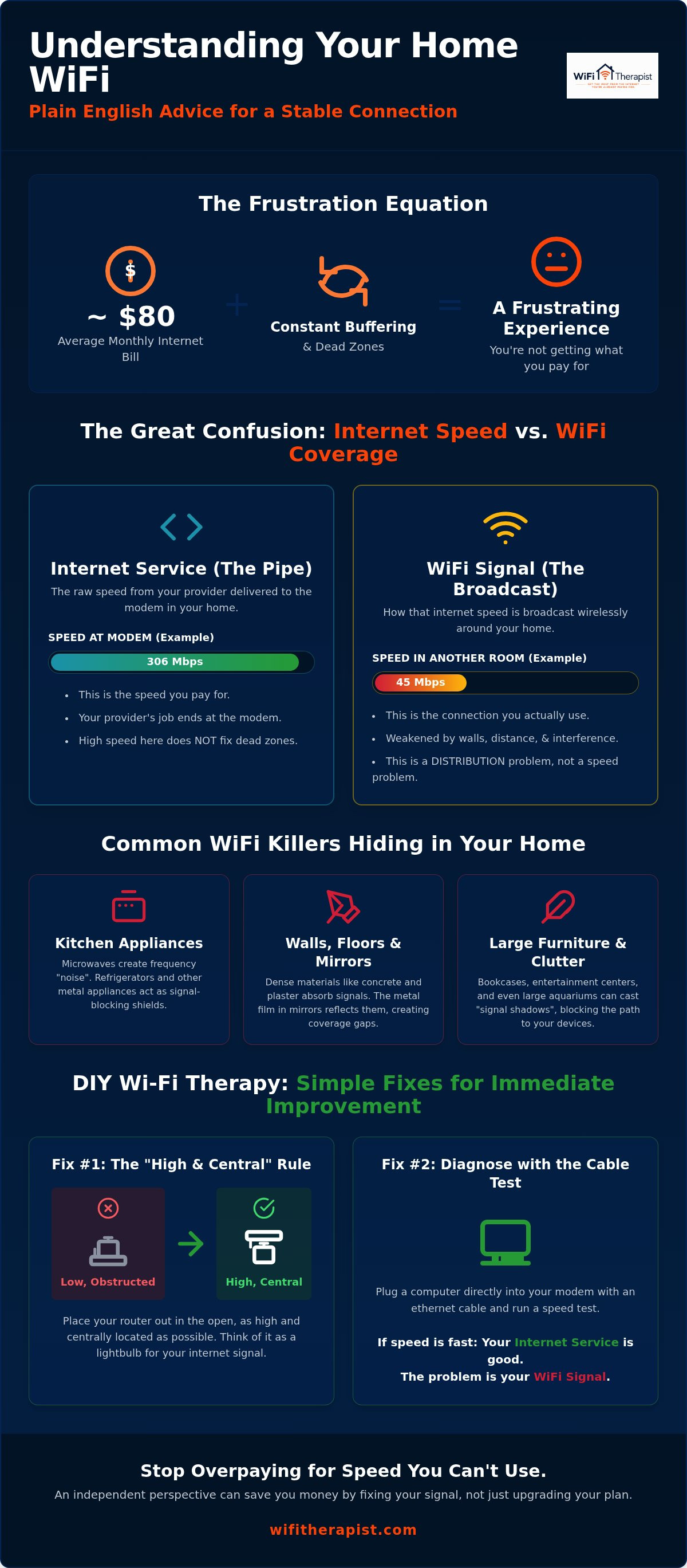
You pay your monthly bill, which likely falls between $75 and $81 based on national averages, and you expect the internet to just work. When it doesn't, the instinct is to call your provider and upgrade to a "faster" plan. However, paying for more speed is often like buying a bigger swimming pool when your garden hose is actually the part that's leaking. To fix the frustration, we need to separate the service you buy from the signal you feel. This plain english wifi advice starts with a simple reality: the internet is a utility that enters your home, while Wi-Fi is merely the invisible thread that carries that utility to your devices.
Think of the internet as the water supply coming from the city into your house. Your Internet Service Provider (ISP) is responsible for the main pipe and the meter at the curb. Wi-Fi, on the other hand, is the showerhead. If you have great water pressure at the meter but a clogged showerhead, your shower experience will be terrible. Your ISP only cares about the pipe. If they can prove the "water" is reaching your front door at the promised speed, they've fulfilled their contract. They aren't responsible for how that signal sprays across your living room or reaches the back bedroom. For a deeper look at the technology behind this "spray," this resource on Wi-Fi Explained covers the foundational standards of wireless networking.
The biggest misconception in home networking is that paying for more "Megabits" will fix a dead zone in the attic. If you have a median download speed of 306 Mbps at your modem but your laptop in the attic can't see the signal, upgrading to a 1,000 Mbps plan won't change a thing. You don't have a speed problem; you have a distribution problem. Physics doesn't care how much you pay per month.
The ISP Pipe vs. Your Home Broadcast
Your modem acts as a digital translator. It takes the signal from the street and turns it into a language your devices understand. It is not, however, designed to be a powerful broadcaster. Many people use the "free" all-in-one box provided by their ISP, but these devices are often the weakest link in the chain. They are built for low cost, not high performance. Bandwidth is essentially the number of lanes on a multi-lane highway; more lanes allow more data "cars" to travel simultaneously, but they don't change the speed of the individual vehicles.
Why "Fast Internet" Doesn’t Always Mean "Good Wi-Fi"
There is a massive difference between the speed at the wall and the speed on your couch. As radio waves travel through your home, they lose energy every time they hit a solid object. Your neighbor's network can also "clog" your airwaves, as wireless signals often compete for the same narrow paths. To see where your issue lies, try a simple test. Plug a computer directly into your modem with a physical cable. If the speed is fast there but slow when you move ten feet away on wireless, your problem is the signal, not the service. This plain english wifi advice helps you identify exactly where the break is so you stop overpaying for "upgrades" that don't reach your devices.
The Physical Reality: Why Your Home Layout Fights Your Signal
Your Wi-Fi signal is essentially a form of invisible light. If you stood exactly where your router is located and looked around, anything that would block your view also blocks your internet signal. Walls, heavy furniture, and even your own body can cast "shadows" where the connection drops. This is why plain english wifi advice usually starts with a simple rule: if you can't see your router, your signal is likely working much harder than it should to reach you.
The kitchen is often the most hostile room in the house for wireless data. Appliances like microwaves and refrigerators are made of thick metal, which acts like a mirror that reflects the signal away from you rather than letting it pass through. Even worse, microwaves operate on a similar frequency to many older routers. This creates "noise" that drowns out your data every time you heat up a snack. If your router is tucked behind the fridge, you're effectively putting it in a soundproof room and asking it to shout. Multi-level homes present a different challenge. Wi-Fi signals generally struggle to travel through the dense wood and insulation of floors, meaning a router in the basement is often useless for an office on the second story.
Common Wi-Fi Killers in Every Room
Many common household items are secret signal sponges. Large mirrors are particularly problematic because they have a thin layer of metal backing that bounces radio waves back toward the router. Fish tanks are another silent culprit; water is incredibly effective at absorbing Wi-Fi energy. If you've hidden your router inside a wooden cabinet for aesthetic reasons, you've added an unnecessary barrier that limits your coverage. To find your home's weak spots, you don't need fancy tools. Simply walk through your house with your smartphone and watch the signal bars. If they drop in a specific corner, you've found a dead zone. You can follow these simple steps to improve your connection by moving just a few objects out of the signal's path.
Overcoming Building Materials: Concrete, Brick, and Plaster
In older homes, the walls themselves are often the biggest enemy. Lath and plaster construction is a common "trap" because it often contains a hidden wire mesh. This mesh acts like a shield, preventing signal from moving between rooms. If you are struggling with a historic property, you may need specific lath and plaster wifi solutions that prioritize "line of sight" placement. This means placing your network gear in hallways or near open doorways where the signal can "see" into the rooms you use most. If your home's layout feels like a maze that physics can't solve, you might want to book a remote discovery call to get a professional perspective on your specific environment.
Deciphering the Hardware: Modems, Routers, and Mesh Systems
Walking into a big-box store to fix your internet often leads to more confusion than clarity. You are greeted by rows of sleek, expensive boxes covered in numbers like "AX6000" or "Tri-Band," yet none of them explain what they actually do for your daily life. This plain english wifi advice aims to simplify those boxes into two main roles: the front door and the traffic cop. Once you understand these roles, you can stop guessing which piece of hardware is failing you.
Your modem is your home’s digital front door. It is the single point where the outside world connects to your private space. Its only job is to translate the signal from your provider into data your devices can use. The router is the "Traffic Cop" sitting just inside that door. Its entire job is to look at the data coming in and direct it to the correct device, whether that is your work laptop or your smart thermostat. When your internet feels slow, the problem is rarely the "door" itself; it is usually the "cop" struggling to manage the traffic or reach the far corners of your home.
Many people try to fix dead zones with cheap "range extenders," but these often create more problems than they solve. A typical extender works by listening to your router and then repeating the signal. Because it has to do both at once, it often cuts your available speed in half immediately. It is like a game of telephone where the person in the middle is only half-listening. This is why your phone might show full signal bars in the bedroom, yet your video still buffers endlessly.
Modem-Router Combos vs. Separate Units
Most people use the "all-in-one" box provided by their ISP because it is simple and saves space. However, these combos are often mediocre at both of their jobs. Power users prefer separate units because they offer better range and more control over security settings. Using separate hardware allows for easier troubleshooting because you can quickly determine if the "front door" or the "traffic cop" is the source of your connection issues.
Mesh Wi-Fi: Is it Worth the Investment?
Mesh networks are a team of broadcasters working together to cover your entire home. Unlike extenders, they allow for "seamless roaming," which means your phone stays connected to the strongest signal as you walk from the kitchen to the bedroom without dropping your call. If your home is over 2,500 square feet or has multiple levels, a mesh system is often a wise investment. To make these systems 100% reliable, you can use a "wired backhaul," which means connecting the mesh units with a physical cable so they don't have to rely on wireless signals to talk to each other.
DIY Wi-Fi Therapy: Simple Steps to Improve Your Connection Today
Hardware manufacturers often suggest spending hundreds on new gear before you have even moved your current router. This plain english wifi advice focuses on extracting the most value from what you already own. Most connection issues aren't caused by broken technology; they are caused by simple physical placement or digital congestion. You can often fix "slow" internet without spending a single dollar or buying a single new box.
One of the most effective tools in your kit is the simple power cycle. Turning your router off for thirty seconds and back on again isn't just a cliché. It forces the device to clear its temporary memory and find a fresh, less crowded wireless channel. It is like a quick nap for your network. Additionally, you should understand the difference between the 2.4GHz and 5GHz frequencies. Think of 2.4GHz as a slow moving truck that can climb over hills and through walls. Think of 5GHz as a fast sports car that needs a flat, straight road. If you are in the same room as the router, use 5GHz. If you are two rooms away, 2.4GHz will likely be more reliable.
The Five-Minute Router Placement Audit
The floor is the worst possible place for your router. Because signals travel outward and downward, placing a router on the ground sends half of its energy into the foundation of your home. You can find the "sweet spot" in your living room by following these simple steps:
- Elevate the device: Place your router on a shelf or mantle at least five feet off the ground.
- Find the center: Move the unit to the most central room in your house to minimize the distance the signal must travel to reach every corner.
- Clear the antennas: Ensure the router isn't buried behind books, photos, or the television.
Optimizing for Video Calls and Streaming
If you are struggling with fix zoom call lag at home, the solution might be a physical wire. A ten-dollar Ethernet cable provides a dedicated, interference-free path that no wireless signal can match. It acts as an "escape hatch" for your most important work. You should also audit your "digital traffic" by disconnecting old tablets or smart home gadgets you no longer use. With an estimated 1.1 billion Wi-Fi 7 devices shipping in 2026, our airwaves are more crowded than ever. Every smart bulb and old phone takes a tiny piece of your router's attention. If these simple steps don't resolve your frustration, you can book a technical consultation to find a permanent solution for your specific home layout.
Finding Peace: When Independent Advice Beats a New Router
The tech industry often thrives on upgrade culture, leading you to believe that a newer, more expensive router is the only answer to your connectivity woes. This pressure is especially high in 2026 as Wi-Fi 7 becomes mainstream and early Wi-Fi 8 products begin to appear on shelves. However, buying a high-end router to fix a signal blocked by a brick wall is like buying a faster car to get through a road closure. It simply doesn't address the root cause. True plain english wifi advice recognizes that your home is a dynamic environment, not a static box. When you stop chasing the latest hardware and start understanding the physics of your space, you find a level of digital peace that no pro router can provide on its own.
You know you have finally won the Wi-Fi battle when you no longer think about your network. It becomes a silent, reliable utility like electricity or running water. This stability is particularly important during major life transitions. If you are planning a home remodel, preparing for a new baby, or starting a home-based business, your network needs to be ready before the first day of the new chapter. Proper planning ensures that your digital infrastructure supports your life rather than complicating it. By focusing on placement and configuration first, you protect yourself from future digital complications and wasted expenditures.
Why an Independent Tech Consultant Saves You Money
There is a significant difference between a salesperson at a retail store and an independent home technology consultant. A salesperson is often incentivized to sell you the most expensive mesh system in the aisle, even if your home doesn't require it. An independent advisor offers an objective audit of your existing setup. Choosing a $50 remote discovery call is often a much wiser investment than a $400 trial and error hardware purchase that might not solve your specific problem. This plain english wifi advice is designed to help you maximize your current resources before you spend a single dollar on new equipment.
The "Technical Mentor" Approach to Home Tech
We believe in moving from a state of frustration to a state of empowerment through clear education. You don't need to be a networking expert to have a perfect connection; you simply need a wise guide to help you navigate the jargon. As we move further into 2026, home networks are becoming more complex with AI-powered features and multi-gigabit speeds. Having a technical mentor ensures your home is prepared for these shifts without the stress of managing it all yourself. Perfect Wi-Fi is achievable for every home when you have the right perspective and a reliable ally by your side.
Reclaiming Your Digital Peace of Mind
You now have the tools to look at your home network through a new lens, seeing it as a manageable utility rather than a constant source of stress. By understanding that your internet service and your wireless signal are two different things, you can stop overpaying for speed tiers that don't actually reach your devices. This plain english wifi advice has shown that the best solutions often involve simple placement changes and a better understanding of your home's physical barriers. You don't have to navigate these technical hurdles alone or keep wasting money on hardware that doesn't fix the root problem.
We act as your technical mentor, providing national remote consultations that prioritize your needs over corporate sales goals. Our approach is independent and non-biased, focusing on practical, cost-saving solutions that maximize the gear you already own. If you are ready to stop the buffering and start enjoying your home again, you can Book a $50 Plain-English Wi-Fi Consultation today. Take back control of your digital life and enjoy the reliable connection you deserve.
Frequently Asked Questions
What is the difference between 2.4GHz and 5GHz Wi-Fi?
2.4GHz is built for range while 5GHz is built for speed. Think of 2.4GHz as a signal that can push through walls but moves data slowly. 5GHz is much faster but struggles to pass through even a single door or a heavy piece of furniture. Most modern devices will switch between them automatically. This ensures you get the best possible connection whether you are close to the router or in another room.
Does a faster internet plan fix Wi-Fi dead zones?
Upgrading to a more expensive plan will not resolve coverage issues in your home. A faster plan only increases the amount of data reaching your modem from the street. If your laptop in the back room can't see the signal, it won't matter if you have 100 Mbps or 1,000 Mbps. You need better signal distribution and improved placement rather than a higher monthly bill from your provider.
Why does my Wi-Fi work in the living room but not the bedroom?
Signal strength naturally fades as it travels away from the router and through obstacles. If your bedroom is separated from the living room by several walls or heavy furniture, the radio waves lose energy with every inch they travel. Dense materials like bathroom tile, mirrors, or large kitchen appliances are especially good at stopping a signal before it reaches your device. Distance and physical barriers are almost always the culprits.
Is it better to buy my own router or rent one from the ISP?
Buying your own hardware is almost always the better financial and technical choice. Monthly rental fees from your ISP can easily exceed $150 per year for a device you will never own. By purchasing your own router, you get a higher-quality device and stop paying a "forever tax" to your provider. This is a core part of our plain english wifi advice for budget-conscious users who want better performance.
How often should I restart my Wi-Fi router?
You don't need to do it daily, but a monthly restart can help keep your network running smoothly. This simple act clears out any software glitches and allows the router to pick a less crowded wireless frequency. It is a quick, thirty-second task that can resolve many common connection hiccups. It works well because it refreshes the hardware without requiring any technical configuration or expensive support calls from outside consultants.
Can mirrors or fish tanks really block my Wi-Fi signal?
These items are surprisingly effective at sabotaging your wireless signal. Mirrors use a thin metal film that reflects radio waves away from your devices like a shield. Fish tanks are essentially large blocks of water, which is one of the most effective materials for absorbing Wi-Fi energy. Moving your router just a few feet away from these objects can make a noticeable difference in your connection quality throughout the rest of your home.
What is a mesh Wi-Fi system and do I actually need one?
Mesh systems use a group of small devices to create a blanket of coverage across your entire property. You should consider one if you live in a large home or a space with thick walls that a single router can't penetrate. Unlike old-fashioned extenders, mesh units talk to each other to ensure your phone always stays on the strongest possible signal. They work as a single team to eliminate frustrating dead spots.
How can I tell if my ISP is the problem or if it is my router?
The easiest way to find the source of the trouble is a direct wired test. Plug a laptop into your modem using an Ethernet cable and run a speed test. If the results are fast, your ISP is doing its job and the problem is your Wi-Fi signal. Providing plain english wifi advice means helping you isolate these issues so you can talk to tech support with confidence and get the help you actually need.


